
Executive Summary:
For CFOs still running Microsoft Dynamics GP, NetSuite is the stronger migration path when the business needs real-time financial visibility, cloud ERP infrastructure, and scalable operations before Microsoft's GP support timeline narrows your options.
Key Takeaways: NetSuite vs. Dynamics GP
- GP migration is now a planning decision with a defined runway, not an emergency.
- Microsoft ends GP new feature development, mainstream support, and enhancements on December 31, 2029.
- NetSuite gives CFOs real-time financial visibility, cloud ERP infrastructure, and stronger integration options.
- GP still has depth, but hosted on-premise software is not a true cloud ERP.
- The hardest migration work is process mapping, GL restructuring, data migration, and testing.
- Microsoft Dynamics 365 Business Central may fit some companies, but it is not automatically the right GP replacement.
- Compare total cost of ownership, disruption risk, scalability, and business fit before migrating.
Microsoft Dynamics GP, the Windows replacement for the legacy Great Plains DOS, is a proven on-premises ERP that has supported mid-market distributors and make-to-stock manufacturers for decades. NetSuite is a cloud-based ERP suite that brings financial management, CRM, supply chain, ecommerce, analytics, and operations onto one platform.
Microsoft announced Dynamics GP's sunset timeline in 2024. Product enhancements, regulatory and tax updates, and technical support end on December 31, 2029, and security patches, if needed, remain available until April 30, 2031.
This guide explains where GP still holds up, where NetSuite changes the operating model, and what a realistic Dynamics GP to NetSuite migration involves. By the end, you should be able to decide whether staying on GP is still defensible, whether Microsoft Dynamics 365 Business Central deserves a closer look, or whether NetSuite is the better fit for your business.
I am Jeff Wilk. I spent 25 years in the Microsoft Dynamics ecosystem as a GP developer, consultant, and advisor, and I chose NetSuite deliberately instead of returning to the Microsoft partner world.
Who Is Still on GP?
The typical company I still see running Microsoft Dynamics GP is not small or simple. It is usually a $20M to $100M wholesale or retail distributor or manufacturer with 20 to 40 core users across finance, purchasing, sales orders, inventory, and operations.
These companies often have 15 to 20 years of history in the system. GP is more than an accounting tool for them. It runs their reporting habits, their inventory movement, their customer service, and the way people work every day.
So I do not treat a GP replacement decision like a simple software swap. You are not only comparing features. You are deciding whether the next ERP can preserve what still works while giving the business better insight, automation, and scalability.
In most of these projects, the CFO or VP of Finance owns the decision. Controllers, department heads, IT, and subject matter experts should shape the requirements. End users should be heard, as they have insight into the day-to-day work in the trenches. I wouldn't want to alienate the end users by dismissing their participation at all.
What Triggers a Migration?

The main trigger is Microsoft's support timeline. Microsoft Dynamics GP keeps receiving new features and regulatory tax updates until December 31, 2029. After that date, new feature development, mainstream support, and enhancements end. The full timeline:
| Milestone | Date |
|---|---|
| New perpetual license sales ended | April 1, 2025 |
| New subscription license sales ended | April 1, 2026 |
| Product enhancements, regulatory and tax updates, and technical support end | December 31, 2029 |
| Security patches end, if needed | April 30, 2031 |
Source: Microsoft, Dynamics GP lifecycle policy.
That does not mean GP stops working the next day. It means you now have a defined planning window. If you wait too long, you will have to compress the evaluation, process mapping, data migration, UAT, training, and go-live into a timeline that should have started earlier.
The second trigger is functional risk. CFOs do not want to give up 20 years of working reports, workflows, approvals, custom fields, and operational habits. I hear the concern directly from serious buyers: "We know we have to get off, but I don't want to take a step back in functionality."
The concern is valid. GP has depth, and it has supported financials, distribution, and manufacturing for a long time. A serious migration should start with business needs first, then the software.
The False Safety Warning
The risk for many Microsoft Dynamics GP customers is not that the system stops working tomorrow. It will not. The risk is that day-to-day partner support can make the long-term ERP decision feel less urgent than it is.
I know the GP partner ecosystem well, and many GP partners still serve their customers well. They know the accounts, the customizations, the reports, the module setup, and the people. In some companies, the GP consultant has been around for 15 years or more, and that relationship deserves respect.
A partner may keep GP running for now, but they cannot change Microsoft's roadmap. That does not make GP a long-term platform for growing businesses that need cloud software, real-time analytics, easier integration, and automation across business units.
This is the false safety problem. You feel protected because the partner is responsive, and meanwhile the planning window keeps shrinking. As CFO, your job is to separate short-term service comfort from long-term platform risk.
GP vs. NetSuite: Key Differences
Microsoft Dynamics GP and NetSuite both have functional depth. GP earned its place because it handled financial management, distribution, and manufacturing well. I am not going to pretend otherwise. I sold GP, built around it, and saw why companies stayed on it.
The real difference is architecture. GP is an on-premise ERP that can be hosted. NetSuite is a cloud-based ERP built as a unified platform. That affects reporting, upgrade planning, integration, customization, and the way teams automate work.
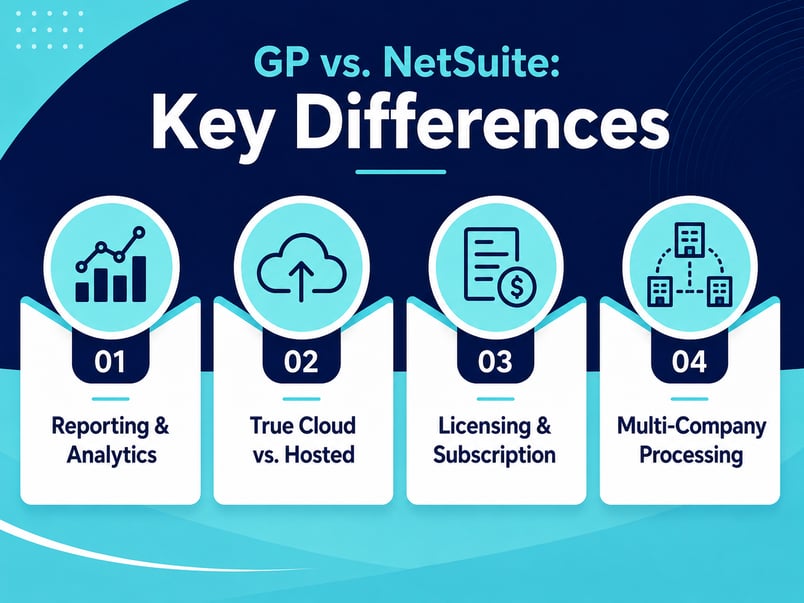
When I compare GP and NetSuite with CFOs, four differences usually matter most: reporting and analytics, true cloud versus hosted on-premises, and licensing.
Reporting, Dashboards, and Analytics
GP reporting can be reliable, especially for companies that have invested years into FRx, Management Reporter, Excel, or third-party BI tools. I have seen GP reports that fit a business well because someone spent years building them.
GP can produce the report. The real question is how much manual work your team needs to unify data across companies, departments, spreadsheets, and connected systems.
NetSuite provides role-based dashboards, KPIs, and financial reporting tied to live transactions. SuiteAnalytics helps finance teams review business performance inside the ERP, without rebuilding every insight in a spreadsheet afterward.
True Cloud vs. Hosted On-Premise
A hosted GP environment is not the same as cloud ERP. If GP runs on someone else's server, the hardware has been moved. The architecture did not.
That distinction matters. Hosted on-premise software still carries many of the same limits around upgrade planning, custom code, server maintenance, and integration patterns. A cloud solution like NetSuite puts the ERP suite, cloud infrastructure, updates, and access model into a different operating structure.
GP was not built as single-version cloud software. Business Central comes up often as a modern Microsoft path, and it may fit some companies, but I would not make this a brand-family decision.
Licensing and Subscription Model
GP's concurrent user model can be economical. If 30 people need access but only 10 are active at one time, the cost structure can work well. That is one reason GP stayed in place for so long.
NetSuite uses named users and an annual subscription model. That can look more expensive at first, especially for companies with many occasional users. I would not hide that from a CFO.
But I would compare the full model. GP carries partner support, hosting or server costs, upgrade projects, custom code risk, and integration maintenance. NetSuite bundles cloud infrastructure, updates, and ongoing access into the annual model. A visible cost is easier to plan.
Native Multi-Company and Inter-Company Processing
Out of the box, Microsoft Dynamics GP (Great Plains) lacks native multi-entity environment functionality. Historically, almost all companies managing complex multi-entity or intercompany processes in GP had to implement a third-party Independent Software Vendor (ISV) add-on called Binary Stream Multi-Entity Management (MEM).
AI and the Month-End Close
AI does not fix a weak process. It amplifies the quality of the data and workflow underneath it.
This is where NetSuite's real-time architecture matters. Month-end close is a repeatable finance process: your team reconciles accounts, posts adjustments, reviews variances, closes periods, and reports results. When the same steps happen every month, automation can remove manual effort and let finance focus on the exceptions.
NetSuite automates on top of live financial data, so finance teams can handle routine steps, surface exceptions, and use analytics to improve close quality. This does not replace the controller. It frees the controller from chasing manual steps the ERP should handle.
How GP and NetSuite Compare for Migration Planning
Here is the snapshot of the dimensions I use in field conversations. Both platforms have depth. The differences show up in architecture, lifecycle, and future-readiness.
| Dimension | NetSuite | Dynamics GP | What to Watch |
|---|---|---|---|
| Architecture | Cloud-based, built as a unified platform | On-premise; can be hosted, but the architecture does not change | Hosted GP still carries on-premise upgrade, server, and maintenance patterns |
| Reporting & analytics | Role-based dashboards, KPIs, and SuiteAnalytics tied to live transactions | Reliable via FRx, Management Reporter, Excel, or third-party BI, with manual unification | Count the manual effort to unify data across companies and spreadsheets |
| Multi-entity | OneWorld supports multi-entity and multi-currency in one platform | Multi-entity needs consolidation work or third-party tools | Map intercompany and consolidation needs before sizing the project |
| Licensing | Named users on an annual subscription | Concurrent users on a perpetual license already paid for | Many occasional users change the math; weigh the full model |
| Lifecycle & roadmap | Single-version cloud with ongoing updates | Support ends December 31, 2029; security patches to April 30, 2031 | The deadline sets your planning window |
Migration Timeline and Risk: What CFOs Should Plan For
For a 100-person manufacturing company with three entities, I would usually expect a Microsoft Dynamics GP to NetSuite migration to take four to six months with an experienced NetSuite partner. A simpler wholesale distribution or finance-focused deployment can be closer to three months.
The timeline depends on entity count, module scope, data migration, integrations, customization, reporting needs, and how well current business processes are documented upfront.
The mistake I see is starting the configuration too soon. A team sees a demo, signs the paperwork, and begins building before anyone maps the current state. Disruption enters right there, when the team discovers the old GL structure, an approval flow, an inventory process, or a reporting requirement after configuration is already in motion.
I use a concrete example with CFOs. If you pour the slab in the wrong place, the expensive part is breaking it up and doing it again. ERP works the same way, so measure twice before you configure.
A sound migration maps the current state, defines the future state, confirms the gaps, plans the data migration, and only then starts configuration. That sequence reduces rework and keeps the project tied to business operations instead of software assumptions.
Data Migration and GL Restructuring
Data migration is where Microsoft Dynamics GP projects get real. The biggest issue is often the chart of accounts.
GP often uses rigid concatenated account strings, with company, department, account, and other segments packed into one structure. NetSuite uses a simpler account structure with flexible dimensions such as department, product, location, class, and subsidiary.
That change can simplify reporting, but it has to be designed carefully. As CFO, you should know what historical data needs to move, what can remain in a controlled archive, and what the business needs for audit, tax, and reporting after go-live.
A read-only GP archive may make sense for some companies, but I would not treat it casually as leaving the old server running until it dies. It should be planned with IT, security, retention, and audit requirements in mind.
Pricing and TCO
Microsoft Dynamics GP can look cheaper because the perpetual license was paid for years ago. That does not mean the ERP is free.
The total cost of ownership includes partner support, server or hosting costs, upgrade projects, third-party tools, integration maintenance, custom redevelopment, security work, and productivity lost to manual processes. Some costs sit in IT, some sit in finance, and some show up as delays, spreadsheets, and workarounds rather than invoices.
NetSuite is an annual subscription. The cost is more visible, and it includes cloud infrastructure, access to the ERP suite, updates, and the platform model. Judge a NetSuite offer by user count, modules, integration needs, implementation scope, and level of service.
The question for a CFO is which platform gives you the right operating model: financial visibility, scalability, and lower long-term disruption risk. Sticker price is the smaller part of that answer.
Do not buy a vague ERP promise from any vendor. Compare the actual business processes, data model, workflow, reporting, and support plan before you commit.
Choose Your Next ERP Before the Window Narrows
Microsoft Dynamics GP has earned its reputation over 25 years. I know because I was part of that ecosystem. The new support and security reality is also real. Microsoft's end-of-support timeline, not your partner's reassurance, sets your planning window. NetSuite is the forward path for CFOs who need real-time visibility, true cloud architecture, and AI-ready infrastructure.
- Know your real deadline: Microsoft's calendar sets the window, and it is already running.
- Weigh architecture first, then features: True cloud and automatic updates change your risk and total cost profile.
- Measure twice before migrating: Map current and future state, and restructure the GL.
Techfino is a NetSuite-focused consulting and solutions company offering NetSuite Implementation, NetSuite Integration, solution architecture, and support, including GP-to-NetSuite migrations. Techfino emphasizes architecture-first delivery, current-state and future-state mapping, and long-term platform scalability. The team includes consultants with GP backgrounds.
FAQ
-
What is Microsoft Dynamics Great Plains, and is it still supported?
- Microsoft Dynamics GP, also known as Great Plains, is an on-premise ERP used by distributors, manufacturers, and finance-led mid-market companies. It is still supported, but on a clock: product enhancements, regulatory and tax updates, and technical support end on December 31, 2029, and security patches run until April 30, 2031.
-
What are the main differences between NetSuite and Microsoft Dynamics GP?
-
The main differences are architecture, a unified, single-database cloud solution, and upgrade path. NetSuite is a cloud-based ERP with automatic updates, while Dynamics GP is an on-premise ERP built around periodic upgrade projects. GP still serves established processes well, while NetSuite gives you a more modern base for automation, dashboards, integration, and analytics.
-
How long does it take to migrate from GP to NetSuite?
- A GP to NetSuite migration often runs four to six months for a 100-person manufacturing company with three entities. A simpler wholesale distribution or finance-focused deployment can take about three months. The timeline depends on data migration, GL restructuring, module scope, integrations, customization, reporting, and how clearly the current state is mapped before configuration starts.
-
Is NetSuite more expensive than Microsoft Dynamics GP?
- NetSuite can look more expensive, since it uses an annual subscription and named users while GP may feel paid off through its sunk perpetual license. Total cost of ownership is the fairer comparison. GP still carries support, server, hosting, upgrade, integration, customization, and productivity costs. NetSuite folds more of the platform cost into a visible subscription.
-
Can NetSuite replace GP for a multi-entity wholesale distributor?
- Yes. NetSuite replaces GP well for multi-entity wholesale distributor or manufacturer that need real-time reporting, stronger scalability, and unified financials. NetSuite's OneWorld supports multi-entity, multi-currency, and inter-company processing in one platform. The migration still has to respect what GP did well, so distribution, inventory, reporting, and supply chain processes need careful mapping before the system is configured.
-
What happens to my GP data when I migrate to NetSuite?
- Your GP data is reviewed, cleaned, mapped, and migrated based on what the business needs to operate, report, and satisfy audits. The hardest part is converting GP's rigid account strings into NetSuite's accounts and dimensions. Some companies move the detailed history; others keep a controlled archive for older records. The right call depends on reporting, compliance, cost, and risk.
-
What are the biggest risks of migrating from GP to NetSuite?
- The biggest risk is starting configuration before the current state is mapped, which creates rework when the team finds missed workflows, reporting needs, data issues, or integrations mid-project. Other risks include underestimating GL restructuring, treating data migration as an afterthought, and skipping change management for long-time GP teams. The fix is upfront mapping, a clear future-state design, and disciplined testing.
Talk to a NetSuite Expert
Tell us what you're working on, and we'll help you figure out the next step.