
Many times during my NetSuite implementations, I encounter clients who are currently using Salesforce for their CRM and are unsure whether to convert from Salesforce to NetSuite once they start using NetSuite as their ERP.
Often they are satisfied with the Salesforce product offering and not keen to take on the additional effort convert their CRM to NetSuite. In such cases, I talk through the advantages of converting (as covered in this blog) to help them make the right decision for their business.
The fact is that from a straight-forward CRM perspective, Salesforce and NetSuite offer similar functionality (including: Marketing Automation, Sales Automation, Customer Support, Channel Management and Lead/Opportunity Management among others) and receive similarly high customer ratings. This comparison from Software Advice provides a good summary of the two products side by side.
So with that being said, why would companies undertake the additional effort to convert to NetSuite when they already have a perfectly good CRM? The answer lies in the peripheral benefits gained from using a unified business management suite which I will delve into next.
While Salesforce is a leader in CRM, it is limited to being just a CRM. In Salesforce, reps lack the insight into inventory levels when making a sale, unless they have access to log in to a separate system to look up stock levels. This can lead to taking sales orders that cannot be fulfilled in a timely manner due to stock outs or item discontinuations.
On the other hand, as you can see below, NetSuite provides a view into inventory tracking, across the company, in real time. Gone are the days of selling products that are no longer available and having to explain to a potential customer that their product is on back order or worse, completely no longer available.
 When you add in NetSuite’s ability to trigger purchasing or assembly of on demand items on sales, the sales reps are comfortable knowing what they promise is what the customer is receiving.
To be fair, Salesforce does offer integrations with some ERP systems that can help with inventory tracking. However, no matter how good the integration is, there will always be a delay.
I can’t tell you how many business cases I have seen where sales reps sell products that the system says are in stock, but by the time the quote in Salesforce is converted to a sale, that inventory is gone. This is frustrating for the rep and even more frustrating for the customer.

White paper

What if NetSuite support actually worked?
See the Continued Success difference.
Get the WhitepaperIn NetSuite, real time inventory, means real time inventory. As a sales rep, if someone else enters a sales order, the inventory numbers immediately update. This means you see what is really in stock, and you can even prevent order creation if an item is not available in real-time.
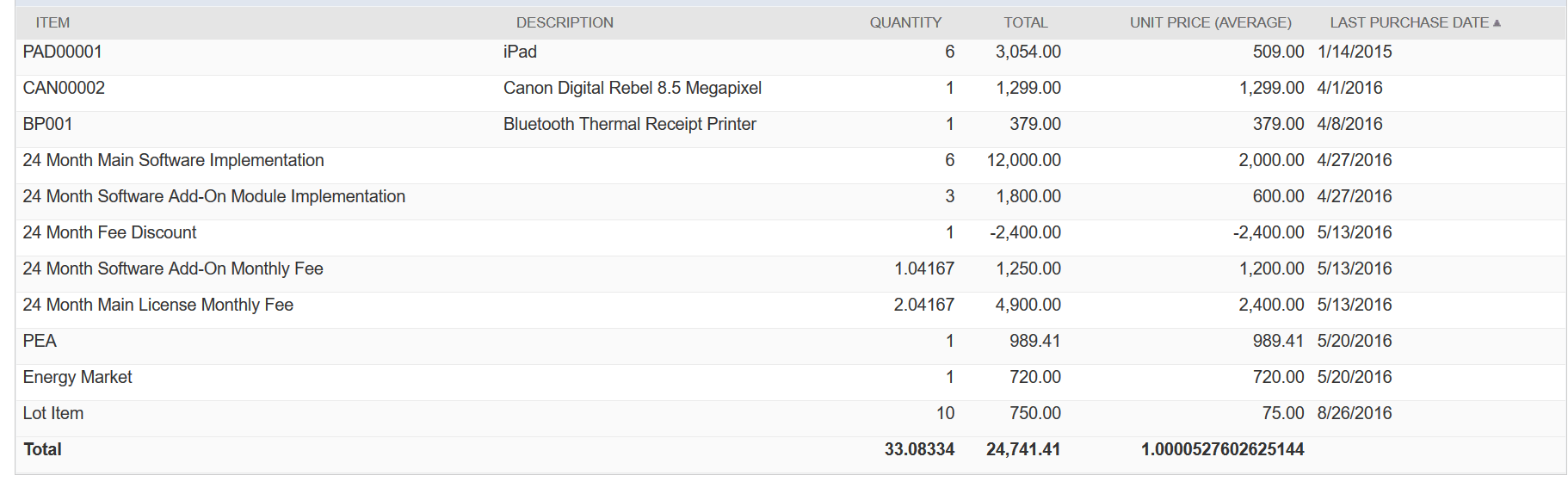
The next big advantage NetSuite brings is an on-going financial view. As shown below, right on the customer’s form, sales reps can see a complete history of what the customer has purchased and when, including an average price. This helps them see how much they should be charging, without running a bunch of reports. In fact, one of NetSuite’s strengths is that it is built around the 360-degree-view of the customer. You can see every single interaction you’ve had with a customer on their record.
 Additionally, the dashboards for sales reps can show a plethora of financial data that Salesforce never could. Here is an example dashboard for a sales rep in NetSuite.
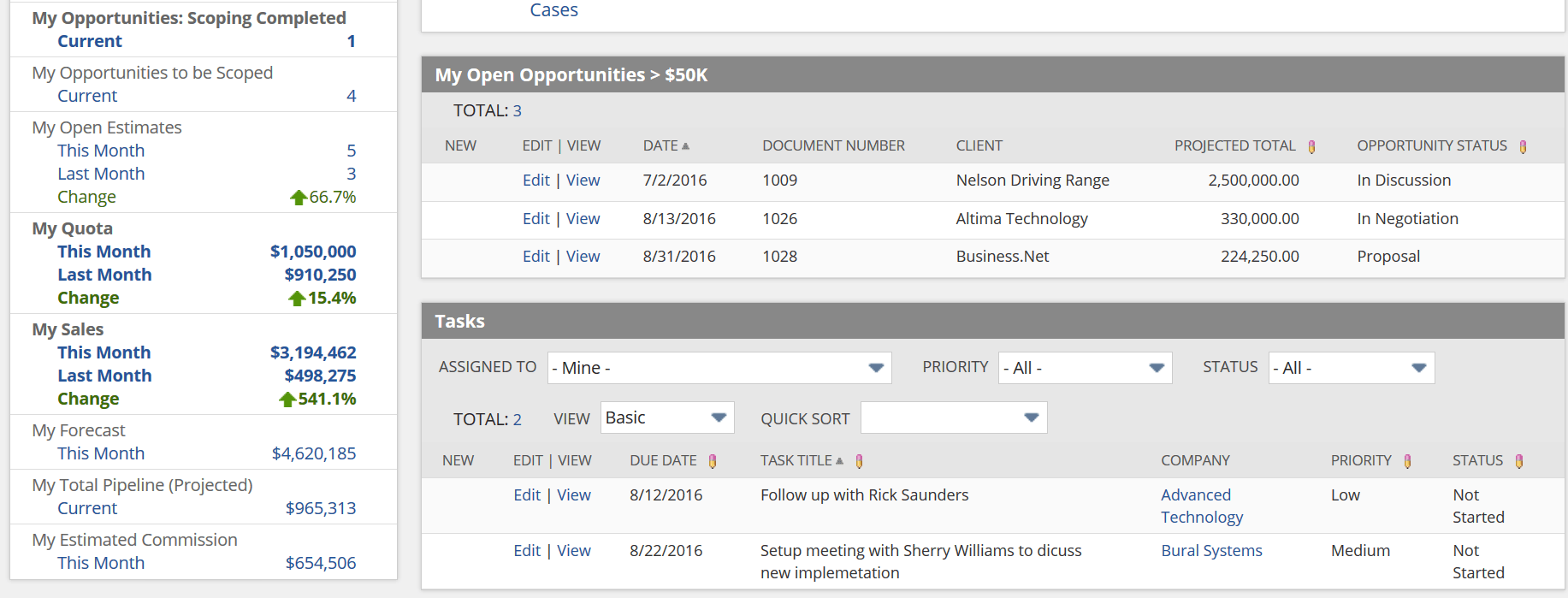 Reps can see things like real time tracking of their quota, their current sales volumes and how that affects their estimated commission. As a sales rep, I don’t have to jump between systems to track all of this or even run reports, I can see it in real time on my dashboard or in my mobile app.
Finally, NetSuite brings the ability to customize the product to the more advanced needs of each company. Through customizations and configuration, NetSuite teams can match the process flows and automation in NetSuite to the complex needs of clients.
These customizations are one of the key things that separate NetSuite from Salesforce. Users can easily hide sections of the dashboard, add KPIs or graphs, and customize reports, without involving an administrator.
Sales is the life-blood of any company. Giving sales reps the best tools to succeed is important to any company looking to grow. While NetSuite and Salesforce are pretty even when it comes to straight CRM functionality, it’s the additional ERP benefits that set NetSuite apart. By giving sales reps a full picture of the business in one location, they are free to sell with confidence.
Need help with your NetSuite implementation? Contact Techfino today.